ChatAgent, included
Your own AI agent in Slack and Teams.
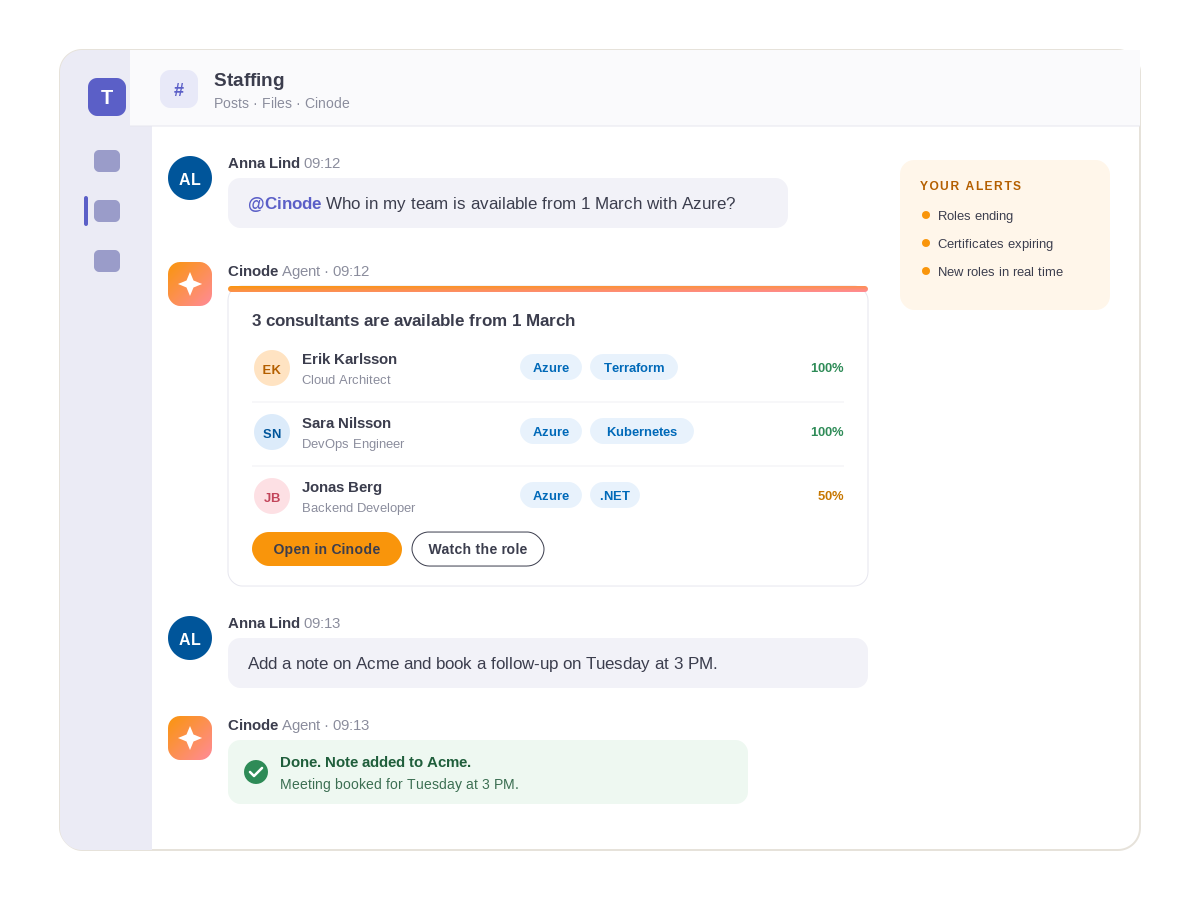
Ask in plain language and get answers with live data from Cinode in seconds. Ask the agent to add a note, book the follow-up and watch the role that is ending.
All without opening a single tab.
Included. An administrator activates it once.
One agent per person
Everyone only sees their own
A notification feed shows the same thing to everyone in the channel. With ChatAgent, every user gets answers within their own permissions.
Knows who you are
Your identity comes from your verified Slack or Teams account. No one can ask the agent to act as someone else.
Sees what you see
Every answer follows your access in Cinode, your teams and your clients.
Does what you asked
Your alerts and reminders, set up by you in the chat. Without going through an administrator.
What the agent can do
Answer, act and watch
Answers with live data
People, skills, availability, roles, projects, clients and certifications. With links straight into Cinode.
Takes action
Creates tasks, notes and meetings on you and your clients. And always confirms what it did.
Watches for you
Roles ending, certifications expiring, contacts gone quiet and new roles in real time.
Reaches out first
Sends your tasks with quick buttons and reminds consultants when their profile has fallen behind.
Remembers the conversation
Ask who is available in October and follow up with which of them know Azure.
The same in Slack and Teams
Both run on the same agent. The experience is the same whichever tool you use.
What it looks like in practice
Five roles. Five agents. One platform.
The resource manager watches the team's availability. The salesperson documents in the deal thread. The consultant learns what is missing from the profile.

The question is asked when it comes up
Who is on the bench and available from next month? Which roles are we staffing at Acme right now? Show my open tasks this week.
The answer arrives in seconds, in the middle of the conversation. Not after a login, a search and an export.
Security
The agent is yours. The data is not free.
Security sits in every answer. Sharing a channel does not widen anyone's access.
Limited to your permissions
Every answer respects your access level in Cinode and your teams and clients.
Protected fields
Sensitive employment details are kept completely outside the agent.
Resistant to manipulation
Built in protection ignores attempts to override instructions or pull out hidden data.
Frequently asked questions about ChatAgent
Does every user get their own agent?
Yes. Everyone in the workspace can talk to the agent and gets answers based on their own permissions, teams and clients.
Is the agent included?
Yes. An administrator activates it once in the Cinode setup guide. After that, everyone in the workspace has their own agent.
Can the agent change data in Cinode?
Yes, within your permissions. It creates and updates tasks, notes and meetings and always confirms what it did.
How is it different from MCP?
The agent lives in Slack and Teams and reaches out with notifications and alerts. MCP connects your data to the AI you already use, such as Claude or ChatGPT. Many use both.
Do consultants need training?
No. Anyone who can write in Slack or Teams can use their agent.
See the agent answer your own questions
We show you how the agent works in your staffing day. Or get started for free in a few minutes.